Posts

Showing posts with the label Remote Desktop

RDP End a Disconnected session
Image
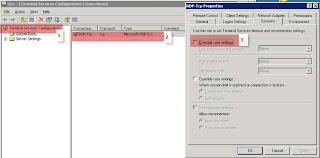
We all have had issues where in a RDP disconnected session wont allow other users to login until the administrator manually kills that disconnected session. Well, I just found out that there is a setting in Windows Server 2003 which would allow to automatically kill a RDP Disconnected session. Go to Start - Administrative Tools - Terminal Services Configuration. In Terminal Services Configuration, select Connections - RDP-Tcp. Right click RDP-Tcp and select properties. Go to sessions tab and select override user settings which is disabled by default. Here is a snapshot of the setting. Many thanks to Cameron Childress for this post titled How to Automatically Log Off Disconnected Remote Desktop / Terminal Services Sessions This article is also good.
Unable to RDP. Enable Disable Microsoft Terminal Services Client Control mstscax.dll

Image
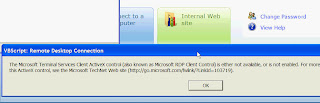
So today i.e. Aug 17 2009 I was not able to remote desktop to my work computer from home. I am on WinXP Pro SP 2 with Internet Explorer 7 and I was able to remote desktop earlier without any issues. Today, I was getting the popup message saying you need to install active x control. See below I knew this had to do with Microsoft Terminal Services Client Control mstscax.dll and you need to enable it for RDP to work. For some reason, Internet Explorer 7, in its manage or enable disable add on feature wont show the Microsoft Terminal Services Client Control mstscax.dll. Here is a way to make it available so you can enable it. 1. When you get the pop up to install active X control as pop up , you get 2 options, Run and Dont run (install or dont install basically). I selected Dont Install. I will tell you later why I picked dont install, so hang on to that thought ;-). 2. Once I selected dont install, I got an small alert box or message info in yellow box from Internet explorer saying clic...